Smart % Reserve Profit

Avatar
  • updated
  • Completed

Hie guys....was thinking of smart feature....to add input for ( % of profit to Reserve to cover for losses)....eg EA saves 70% of every profitable trade to close a future/current lossing trade/trades...say EA closes a profitable trade at $100 it will have $70 reserved profit ...after X numbers of loosing trades EA starts to use the Reserved profit to close the loosing trades using the $70 reserved profit(this feature should work both when the EA is in profit or when its in loss)Please support guys i see this feature really giving some good results 


Here we can also   have options like sort by profit or time

Avatar
0
Andrey Khatimlianskyi
  • Completed

Done in 3.2.2 – https://communitypowerea.com/docs/versions-history#versions-history

With preserving of reserved profit, as you initially wanted.

Avatar
0
The Scalper

Hie Andrey..... Thank you so much for work.... lets get testing😊

Avatar
0
lucian gabriel

Thank you, Andrey, for adding this wonderful feature to the best robot. I had been thinking about this feature for a long time as well, but I believed it would be difficult to add to your robot.

So, this is about a function that helps reduce losing positions through hedging—that is, when multiple winning positions appear, it closes the losing ones in order to reduce drawdown.

Continuing with this idea, do you think it would be possible to add a manual button in the robot to reduce the hedge volume of sell and buy positions when the winning ones are more numerous than the losing ones? A kind of “reduce hedge volume” feature.

This button already exists in the robot called AW Recovery EA from the MT4 Market, and it would be extremely useful.

Avatar
0
Andrey Khatimlianskyi
Quote from lucian gabriel

Thank you, Andrey, for adding this wonderful feature to the best robot. I had been thinking about this feature for a long time as well, but I believed it would be difficult to add to your robot.

So, this is about a function that helps reduce losing positions through hedging—that is, when multiple winning positions appear, it closes the losing ones in order to reduce drawdown.

Continuing with this idea, do you think it would be possible to add a manual button in the robot to reduce the hedge volume of sell and buy positions when the winning ones are more numerous than the losing ones? A kind of “reduce hedge volume” feature.

This button already exists in the robot called AW Recovery EA from the MT4 Market, and it would be extremely useful.

Have you tried Partial close: any with any mode (https://communitypowerea.com/docs/partial-close#close-any-with-any-mode) ?

Do you want a separate button to activate it?

Avatar
0
lucian gabriel

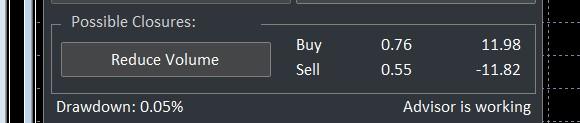
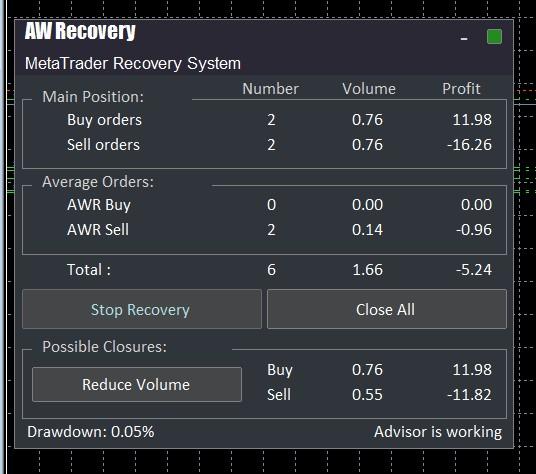
                      I tried partial close, but not all sell and buy positions in a hedge lock will be closed simultaneously. The goal is to instantly reduce drawdown by reducing the losing volume using the winning volume; this will free up the blocked margin and increase the free margin and margin level in the account. Basically, this is an aggressive and instantaneous manual maneuver through a mechanical action triggered by this button, which no robot in the world has except AW Recovery, which is very weak and has limited options.                                                                                                                                                                                                                                                                                                                                                              Yes, I would prefer a button because it would be much more useful when, for example, you have a spike and want to immediately reduce the sell and buy volume without waiting for the indicators to react. However, I think it’s not easy to implement this feature. I use this function in the AW Recovery EA robot, where there is a “Reduce Volume” button that is extremely effective, but this robot (AW Recovery) is very limited. I use it out of necessity to reduce drawdown, and it cannot compare to CP, which is the best, having extraordinary features. Here is an image of that robot so you can see the button I’m referring to.      

Image 6836


Image 6835

Avatar
0
Andrey Khatimlianskyi
Quote from lucian gabriel

                      I tried partial close, but not all sell and buy positions in a hedge lock will be closed simultaneously. The goal is to instantly reduce drawdown by reducing the losing volume using the winning volume; this will free up the blocked margin and increase the free margin and margin level in the account. Basically, this is an aggressive and instantaneous manual maneuver through a mechanical action triggered by this button, which no robot in the world has except AW Recovery, which is very weak and has limited options.                                                                                                                                                                                                                                                                                                                                                              Yes, I would prefer a button because it would be much more useful when, for example, you have a spike and want to immediately reduce the sell and buy volume without waiting for the indicators to react. However, I think it’s not easy to implement this feature. I use this function in the AW Recovery EA robot, where there is a “Reduce Volume” button that is extremely effective, but this robot (AW Recovery) is very limited. I use it out of necessity to reduce drawdown, and it cannot compare to CP, which is the best, having extraordinary features. Here is an image of that robot so you can see the button I’m referring to.      

Image 6836


Image 6835

Partial close (any with any) does exactly that: closes orders with a total profit >= X.
Why to keep this manual? Why not to use Partial close?

Avatar
1
lucian gabriel

Thank you, I understand the idea. So it’s partially true—close is very good as it is, but it only works in automatic mode, not manual. For example, I use very large volumes when I scalp and take maximum risk, and manual intervention helps me more—entering and exiting the market exclusively by hand. During normal trading, however, I let it run automatically with partial close.

In this case, the way I see it, it might be more suitable to build a utility tool designed specifically to handle these manual operations. That’s why I was wondering if it could be integrated into CP. For now, I use everything separately and manage reasonably well.

I was also thinking that maybe the CP graphical interface could be made a bit larger, so it can display more valuable account-related information, as well as additional buttons—such as a “close profit only” button.

I will continue to study and come up with new ideas. Thank you once again for your attention and the effort you’ve put in.

Avatar
0
lucian gabriel

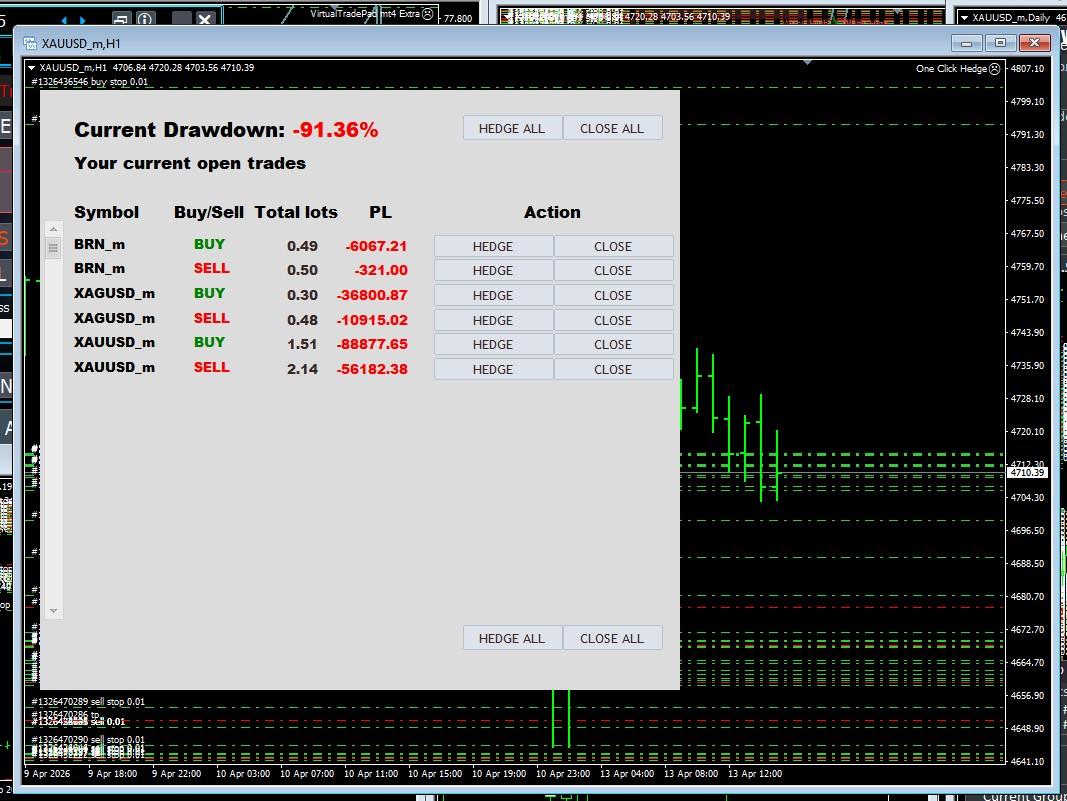
I want to show you the manual utility tool I use together with CP—it would be great to have these functions in CP, or vice versa.

Image 6837

Avatar
0
Andrey Khatimlianskyi
Quote from lucian gabriel

Thank you, I understand the idea. So it’s partially true—close is very good as it is, but it only works in automatic mode, not manual. For example, I use very large volumes when I scalp and take maximum risk, and manual intervention helps me more—entering and exiting the market exclusively by hand. During normal trading, however, I let it run automatically with partial close.

In this case, the way I see it, it might be more suitable to build a utility tool designed specifically to handle these manual operations. That’s why I was wondering if it could be integrated into CP. For now, I use everything separately and manage reasonably well.

I was also thinking that maybe the CP graphical interface could be made a bit larger, so it can display more valuable account-related information, as well as additional buttons—such as a “close profit only” button.

I will continue to study and come up with new ideas. Thank you once again for your attention and the effort you’ve put in.

Thanks for the feedback!

Your case is very specific. I'm not sure I'm going to extend the current EA panel.